
Sometimes doing remote work becomes a mess because of a lack of tools and knowledge. Doing remote work can be very useful and comfortable for you if you properly do the work; otherwise, it will ruin your work efficiency and increase your frustration. You need to plan how you are going to work.
In-office, you have many advantages and facilities which make your work easy but when you are doing remote work you need to manage stuff by yourself like maintaining your working space, gathering required tools and documents, etc. There are some online tools available on the internet, which could be very helpful for you during the time of remote working.
Here we listed the top 5 Best tools which can make your work easy during situations like work from home and remote working:
CleverPDF
CleverPDF is an online tool that you can use to apply various operations on your PDF Documents like PDF conversions, compression, image extraction, image converter, security features like encryption, password protection, and many more. The most useful feature of this tool is, you can use it on your desktop operating systems.
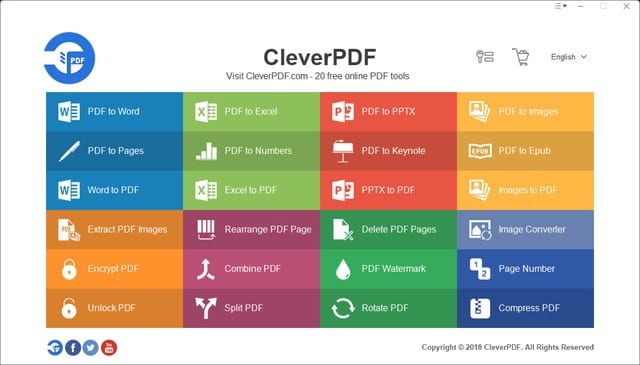
They have provided a desktop version of CleverPDF for Windows and Mac Operating system. Especially during the time of remote working you need to transfer documents and to handle files from your own at that time this tools can increase your efficiency, and you can use this tool according to your language preference, it’s site is available in many languages like Deutsch, François, Italiano, Español, Polski, Nederlands, Turkce, etc.
Video Call Applications
Communication is the most essential thing in any teamwork, and when you are going remote working, then if you have any lack of communication, then it leads to a series of misunderstandings and frustration. The audio communication is excellent by it can never give the real feel and comfort of face to face communication.
There are many video conferencing applications available on the internet, and you should be very careful while selecting the right one for you because it should be able to satisfy your and your teammate’s/colleagues’ requirements.
Like it should have a responsible video conferencing feature in case you need to do any urgent meeting together, and it should be able to add as many members you need to add. We recommend you to you use some verified applications for that like Skype and Google Duo, which have maintained a good review in the field of video call service by the real customers.
Google Drive
You need to store your data files at a location where you can easily retrieve it and what could be a better option than storing it on cloud storage, where you can download or upload it anytime you want and from any place using the internet.
In your office, you have company servers to handle your data, but while doing remote work, you need a storage unit that can have ample storing space and still be able to do all the functions without causing any error or problem.
Google Drive would be the best solution for that because they have a tremendous capacity to provide you that service efficiently. It is one of the best in their field, and it provides some free space for their users to use before paying the fees for the larger space.
Microsoft OneNote
It is very important to plan your whole work and remember the very task which you need to do no matter how small it was. By while doing remote working many times, things got slip form your mind, and that cause issues like late work and decrease your productivity.
For avoiding these issues, you should use the Microsoft OneNote application where you can make small notes about the next task or any relevant term which you will need in the future. Here you can also make a to-do list that can help you to plan your work. Microsoft is a trusted brand, and its product OneNote also got many good reviews, which makes it one of the ideal tools to use during work.
Hub Staff
Hub Staff is an online application using which you can keep track of your team and there working status. Here you can work like you work in the office and maintain good coordination with your team.
It is very problematic to be in sync with your colleagues and teammates. While doing remote work and mainly if you belong to a field where you need to divide the whole task into parts, and the entire team is doing their own assigned work. The Hub staff application can be the answer to all those problems of yours.
Summing Up
All these applications have good recommendations from their customers, but still, there are many tools that you can use to give your best in the remote working environment.
Nowadays, if you want to be the best, then you need to be a smart worker, and for that, you should be able to use technology to your advantage. There are many excellent and helpful tools available on the internet. You should check them and never miss out on any opportunity to improve your productivity at work.
woman working from cafe -DepositPhotos
- Top Hassle-free Steps To Establish A Business Successfully
- The Heart/Mind Conundrum And The Art Of Collective Creativity
- Revenue Optimization Factors That SaaS Companies Must Monitor
- How Voice Acting Can Boost Your Business and Career Opportunities
- The Main Business Expenses to Plan For
- How To Overcome Your Productivity Addiction For Better?