
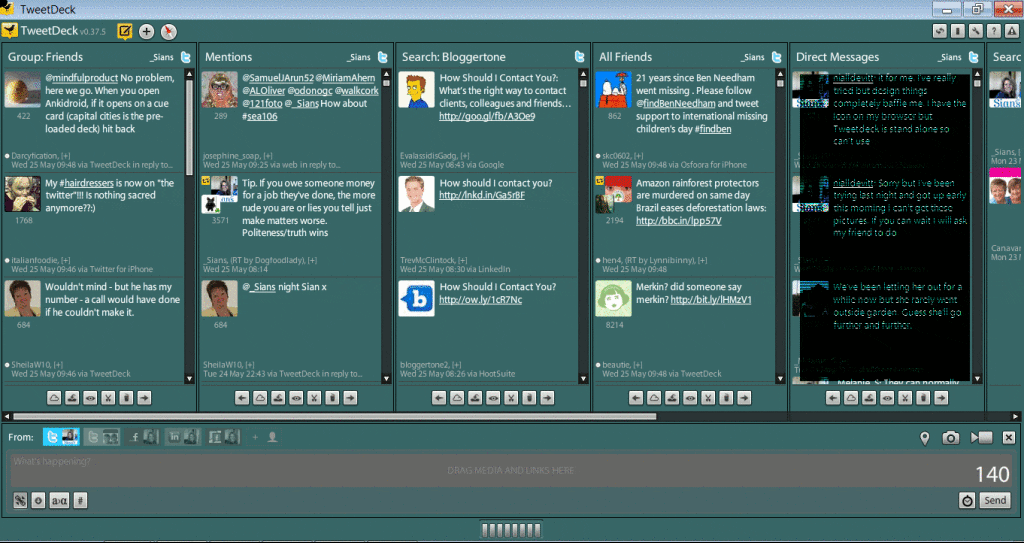
There are lots of free applications which enhance and facilitate your use of Twitter: Tweetdeck, Osfoora, Hootsuite, Tweetcaster, Twicca, etc. I’m sure they all have similar features. Personally, I prefer
You can add your other Social Media accounts:– Facebook – personal profile and business pages, Linkedin, MySpace, Buzz and Fourquare. Also if you have more than one Twitter account, eg you have a personal and business Twitter alias or you Tweet for a client they can be added too. This saves time switching between your different Social Media accounts if sometimes you want to say the same thing. Plus if you do tweet on behalf of a client sometimes you don’t need to log out as you and then back in as the client as you would have to on the Web based Twitter.
Tweetdeck on Mobiles
You can sync it with Tweetdeck on your iPhone (and smart phones) so the columns are the same. So you can tweet on the go the same as you would at home. Just download Tweetdeck on your phone and log into your account.
Filtering out

This is something I am asked about a lot. “How can I stop seeing all these tweets about XYZ? I don’t want to stop following the people – just those types of tweets.” You can filter out certain words, people or sources which is very handy and can be switched on and off as you want. Go to the spanner settings button then choose Global Filters. This is great if you don’t want tweets about football, xfactor, ge11 etc to fill up your view. I really like this feature sometimes.
Auto-completes Names
Tweetdeck auto-completes Twitter names so you only have to start typing the name and it gives you suggestions from your followers. So you don’t have to remember everyone’s exact name. Unfortunately I think I miss a lot of tweets to me because of the underscore before my name @_Sians because obviously people don’t always remember that. If using Tweetdeck you don’t need to worry about your tweets not getting to the person.
You can shorten links as they are typed so it fits into your 140 character tweet easily. On the bottom left of your screen there is what I think looks like a cracker – click on this to shorten a link in your tweets. This is very helpful when limited to 140 characters.

You can tweetshrink your tweet – so if it is slightly over the 140 characters Tweetdeck will try and shorten it for you. This is the little downward arrow.
If you need to translate a tweet into another language, from Afrikans to Yiddish, you can on Tweetdeck using the “a” button.
When you are using hashtags on your tweet you can search ones you’ve used previously using the # button. This is handy if you are having different conversations using different hashtags.
Easy Replies / Retweets / DM’s / Spam Reporting and more
To get the square buttons as on the picture just hover your cursor over the Avatar of someone’s tweet. You can reply simply by clicking on the top left curly arrow.
Simply Retweet the tweet by clicking on the bottom left arrow.

To send a Direct Message to that person click on the top right envelope.
To report Spam, Block, Follow, Unfollow, Email, Favourite, Translate tweet, View Profile and more click on the bottom right star (that’s what it looks like to me). This button is great as you can do a lot with it very quickly. I particularly like the Block and Report Spam feature as it’s quick and feels very cleansing. 🙂
Real time Tweeting

There is the option to choose real time Twitter streaming. This goes fast depending how many people you follow. It means that you can see all your followers tweets but it updates constantly so you can get quite dizzy when watching. The upside of the realtime streaming is that you can see who people you follow are tweeting with whether you follow them or not. Normally you can only see your followers tweets if they are tweeting someone you already follow. Seeing the rest means you can catch up with conversations you may be interested in plus see new tweeters that you weren’t aware of before with similar interests maybe. It can help extend your Twitter horizon.
Photos / Videos / Location / Scheduled Tweets
By clicking on the pin icon on the bottom right of the screen you can choose your location to tweet from. This would be useful in the Foursquare application too.

Simply add your photos to your Tweets by clicking on the Camera button and you can choose your photo from your files. It is the same to upload videos by clicking on the Video Camera button.
If you wish to schedule a Tweet to send later then click on the alarm clock.
The first time I used Tweetdeck I found it quite intimidating as the columns were all updating. I likened it to a flight controllers deck at the time. But stick with it and you won’t look back. I hope the above is helpful if you do decide to try Tweetdeck or are struggling with it at the moment.
What do you like about Tweetdeck or the Twitter Application that you use?
- Search Engine Optimization Tips for Total Beginners
- Put Detail into Retail: Why Supermarket Advertising Will Benefit Your Business
- Top 7 Strategies to Transform Your Post-Purchase E-Commerce Customer Experience
- What is Distributed Marketing and How Does It Work for an Organization?
- How to Use Packaging to Market Your Clothing Brand
- How Social Signals Affect Your Search Engine Rankings
