
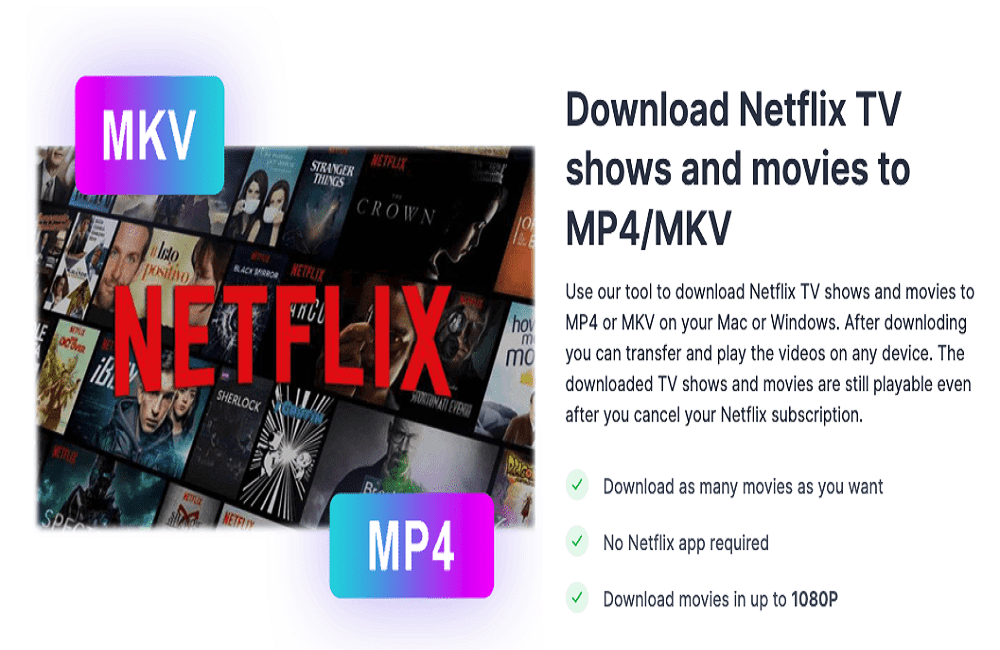
With over 221 million subscribers worldwide by the end of 2021, Netflix is easily one of the most popular streaming services in existence, and it continues to grow every year. However, Netflix comes with strict offline playback limits. It is not possible for you to watch Netflix movies or shows offline on Mac as there is no Netflix app for Mac. You can only download movies and TV shows on 1, 2 or 4 phones or tablets based on your subscription plan. This is when using Pazu Netflix Video Downloader can assist. It is a professional Netflix video downloading tool that can help you download any movies and TV shows from Netflix to MP4 on PC and Mac to watch them offline on any device.
Why to use Pazu Netflix Video Downloader
Netflix introduced its “download feature” for offline viewing back in 2016, allowing its users to download content and enjoy it offline while they are on the go.
However, Netflix’s download feature has some restrictions, something most of you might already be aware of if you are a frequent user.
So what precisely is the download limit on Netflix, and how can you get around this limit? To find out about this, continue reading.
- Firstly, devices you can download content on limited to 1 device for Basic plan, 2 devices for Standard plan and 4 devices for Premium plan.
- Secondly, you can only download Netflix movies and TV shows on iOS, Android, Fire tablet and Windows 10/11. Mac is not supported.
- Thirdly, you can have 100 active downloads at a time per device on as many devices included in your membership plan.
- Fourthly, downloads will expire after a period of time, and some have a limit on how many times they can be downloaded per year.
- Fifthly, every month, Netflix adds a bunch of new content to its library of films and TV shows. But to make room for the newbies, some of the shows and movies you always wanted to watch – and had in your My List for months or years – suddenly disappear.
Pazu Netflix Video Downloader Features
Now that you’ve acquainted yourself with the most common download limit-related errors you might encounter on Netflix, you may want to get rid of all these limits. Pazu Netflix Video Downloader is developed for you to bypass all these download limitations. It is a very effective tool that can be considered for the purpose of downloading Netflix movies and TV shows to MP4 on PC and Mac with ease. The downloaded videos can be transferred from one device to another as per your convenience and all that, too, without having to be technically sound.
- Download Netflix videos to MP4: One of the best features that come along with the Netflix Video Downloader tool is that you can use it to download the videos in MP4 format or MKV. When downloading your movies or TV shows, choose the video format that best suits your needs. These video formats are very useful because you can transfer the downloaded material to a USB and transfer it to another device.The two formats offered by Pazu Netflix Downloader are universal formats and therefore used by most devices. These formats make it easier for you to transfer the movies you have downloaded.
- Download In High Quality: When you want to watch a show or movie, it is very important to have good video quality. It makes your experience better because you are able to fully immerse yourself in the media. pazu Netflix downloader offers you the option to download movies and TV shows in 1080p. 1080p is HD quality, which means that the quality of the video will be clear and smooth. This will make the whole experience even better.
- Keep Netflix Videos forever: Movies and TV shows you downloaded from Netflix will expire after a period of time, and some have a limit on how many times they can be downloaded per year. However, by downloading your favourite videos to MP4/MKV on PC and Mac, you can preserve them forever, even after your subscription expired.
- Multilingual Subtitles And Audio: Pazu Netflix Downloader also gives you the option to select the audio and subtitles you want to download. This is perfect for those who like to watch TV shows and movies with subtitles. In addition, Netflix only offers about 5 to 7 of the most relevant languages depending on your location, and only 2 of the most relevant languages when you want to download a movie or TV show. However, with the Pazu Netflix Downloader, you can choose any language you want. This added flexibility is great for those who prefer to watch shows and movies in their own language and Netflix does not offer downloads in that language.
There are many benefits to using Pazu Netflix Downloader, all of which combine to simplify your experience of watching Netflix movies and TV shows offline. It allows you to watch your favorite Netflix shows and movies offline, a feature that is very beneficial when you don’t have internet or a weak signal. In addition, the quality of the videos is quite high. You can watch the media in HD quality with clean and smooth visuals, which makes your whole experience quite enjoyable.
How does the Pazu Netflix Video Downloader Work
Features a built-in Netflix web player, you do not need a Netflix app when using Pazu Netflix Video Downloader to download videos. Instead of having multiple apps doing the same thing, you can opt to have one, the Pazu Netflix Video Downloader, that can do everything in one. This makes everything a lot more efficient and organized.
Step 1 – At first, you need to install the Pazu Netflix Video Downloader on your PC/Mac through their website.
Step 2 – After installing the respective software, you need to run the tool and then get the same registered using your Netflix account

Step 3 – After logging in, search around for any movie or tv show that you like wish to watch. Or paste the video URL from your browser.
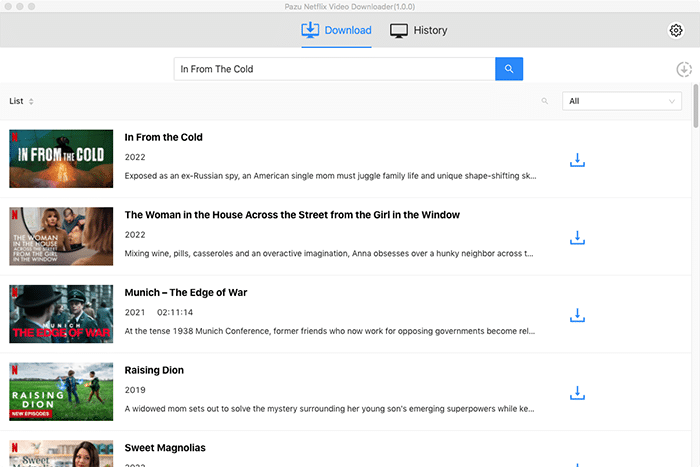
Step 4 – As and when you select the video to be downloaded, you need to then select output format and resolution.
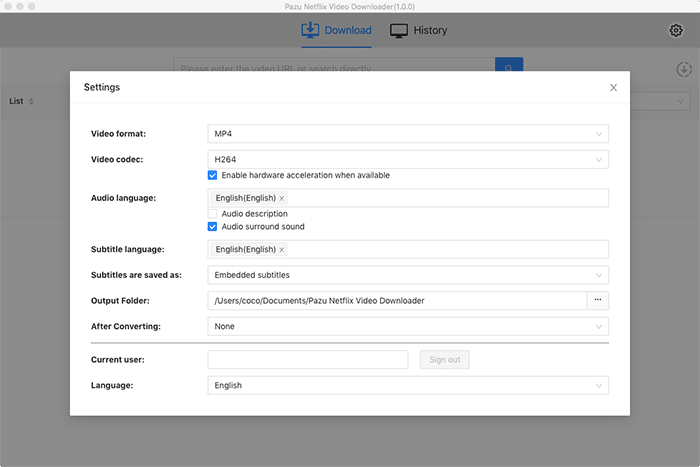
Step 5 – Lastly, when you have selected the format of download, you just need to click the “Download” button, and you get the file on your device in a matter of seconds.
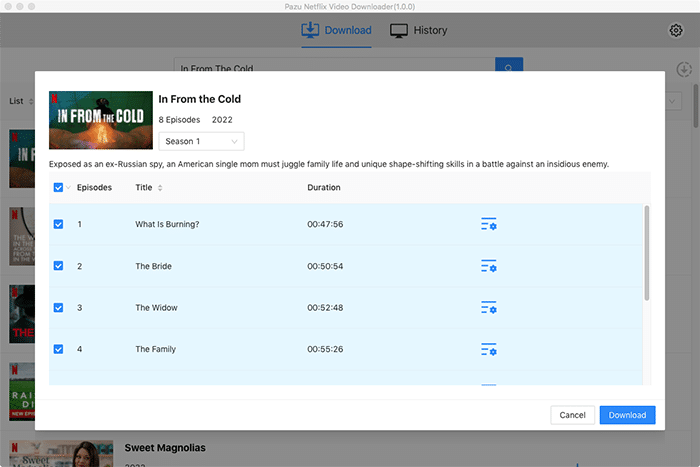
This is how you can get the Netflix video downloaded to your Mac/PC with the help of the Pazu Netflix Video Downloader.
Final Verdict
The download speed offered by this application is also quite amazing and paired with the easy to use interference, the whole experience of downloading shows and movies is painless and simple. The option to download unlimited movies and TV shows is another powerful feature which makes Pazu Netflix Downloader one of the best Netflix app downloaders.
