
For any business, the primary objective is to earn revenues. And for that, marketing the products and services in a proper manner is important. No matter what you do, you need to know how to persuade people to buy your products. And you need to do this in every step of the business. And that holds true for web design as well.
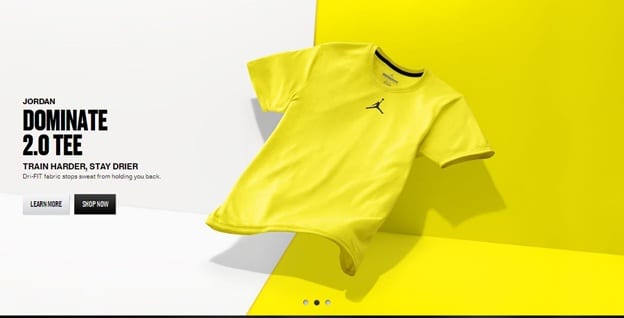
For instance, take a look at this image from the website www.nike.com:
A perfect example of persuasive web design, this image shows a product vividly with the name. There’s a perfect blend of the colors. Besides, it is accompanied by a clear call to action.
This example very much elaborates what a persuasive design is. However, when you are planning to replicate it in your website, you need to know a few basic techniques for it. Here’s a look at a few of them:
Clarity – the Basic Requirement
Clarity has to take the driver’s seat if you are planning to build a persuasive website through the design. Remember, if there’s ambiguity in the design, the viewers will never feel like staying in your website for long. And it will surely reflect in form of the declining revenues. A clear design, on the other hand, will help to improve user experience and hence, is likely to help in increasing the revenues.
Visual First
What attracts your potential customer immediately in your website, as soon as she lands there? Is it the call to action? The content? Or something else? Well, the thing that has an immediate effect on the viewers is the visual. In fact, researches have shown that as much as 96% of the website visitors pay more attention to the visual before shifting to the content. So, are you are planning to persuade the visitors to your website to take your brand seriously and to convert them into your customers? Then you need to focus on enhancing the visual appeal of the website in the first place. This is likely to help you reduce bounce rates and engage the visitors more.
Set the Visual in Proper Hierarchy
When you are saying visual appeal, you need to keep in mind almost every aspect of it. And an important part of this is the visual hierarchy. Use the designs, colors, and the images in such a way that the viewer is able to understand the importance of each component in the web page immediately. The easiest way to do this is to give the most important thing in the web page the biggest size. Thus, it easily catches the eye of the viewer and ensures that she does not miss it under any circumstance. This is where the hierarchy in the visual remains extremely important.
Add a Call to Action
A page without a call to action is as good as an incomplete one. When your website has such a page, you have minimum chance of converting a random visitor into your customer. Hence, this is almost of no use for your business. Rather, it is important to design the page in such a way that the visitors feel persuaded to become a regular customer for your business.
This is where a persuasive web design with a call to action comes in handy. Adding a call to action enhances the chances of conversion in your website. This, in turn, helps to expand your business to a certain extent. When you are planning an engaging and persuasive call to action, adding a separate clickable button with it can also be a great idea. It will be easier to attract the attention of the viewers with such buttons, which will help to increase conversion.
Keep User Behaviors in Mind
The user behavior plays an important role in deciding how the website should be designed. It is observed that the readers notice more words above the fold. Hence, it is always advisable to place the most important points on the upper part of the page. Moreover, it is necessary to keep one thing in mind: visitors to your website hardly read the web pages; they just scan through them. Here’s a look at the time spent by users in each web page:

It’s true that 96% pay more attention to visual first. But the content still remains the king. So, no matter how you are designing the website, you need to pay attention to the content as well. The content part will play a major role in dispelling all kinds of doubts that the reader might have. The web design will need to play a major role in this as well. The content needs to be placed on the web page in the best possible way, so that it attracts the attention of the readers immediately.
__________________________________________________________________________________
 Connect with Tweak Your Biz:
 Connect with Tweak Your Biz:


Would you like to write for Tweak Your Biz?
Tweak Your Biz is an international, business advice community and online publication. Today it is read by over 140,000 business people each month (unique visitors, Google Analytics, December, 2013). See our review of 2013 for more information.
An outstanding title can increase tweets, Facebook Likes, and visitor traffic by 50% or more. Generate great titles for your articles and blog posts with the Tweak Your Biz Title Generator.